
 Configure alarm parameters and review alarm information
You must save the configuration information on a Simatic MC card in JSON format. Use jsonbeautifier.org to help you prepare the file.
The file must contain the following fields in this exact order, as the PLC processes them sequentially:
- Token. See Octalarm Link | REST API connection: Request and using a token to find the token in the alarm dialler.
- IP
- Locations
- Alarms
Do not change the field order—otherwise, the PLC will not process the file correctly.
{
  "Token": "eyJ0eXAiOiJKV1QiLCJhbGciOiJIUzI1NiJ9.eyJmcmVzaCI6ZmFsc2UsImlhdCI6MTY2OTg5MDk2NiwianRpIjoiMDUyMzJmZjAtZjJjZC00NTdlLTlmYTUtOGExMjY1OTY2NjQxIiwibmJmIjoxNjY5ODkwOTY2LCJ0eXBlIjoicmVmcmVzaCIsInN1YiI6IlJFU1QtQVBJXzAwMDUiLCJ1c2VyX2lkIjo3LCJyb2xlX2lkIjo1LCJsYW5ndWFnZSI6Im5sLU5MIn0.hp9hictrwsLW5W2G3XFKPMqChf0_0oXxcSoWGpmZF-A",
  "IP": "192.168.10.72",
  "locations": [
    {
      "categories": [
        {
          "name": "Not-Urgent",
          "topic": "Not-Urgent"
        },
        {
          "name": "Urgent",
          "topic": "Urgent"
        }
      ],
      "custom_id": "1",
      "name": "Loc_01"
    }
  ],
  "Alarms": [
    {
      "alarm_value": false,
      "category_topic": "Urgent",
      "location_custom_id": "1",
      "message": "dept.1 temperature too high",
      "name": "dept.1 tempHH",
      "unique_id": "al_01"
    }
  ]
}
Limits
Locations
| Description | minimum number of characters | maximum number of characters |
|---|---|---|
| Custom_id | 1 | 50 |
| Name | 2 | 20 |
Categories
| Description | minimum number of characters | maximum number of characters |
|---|---|---|
| Name | 2 | 40 |
| Topic | 1 | 50 |
Alarms
| Description | minimum number of characters | maximum number of characters |
|---|---|---|
| Message | 2 | 200 |
| Name | 2 | 80 |
| Unique_id | 1 | 120 |
Note:
- Field names are case-sensitive.
- This example shows only one location and one alarm to illustrate the required configuration format. Follow the same structure when configuring multiple Locations or Alarms for your plant.
- The default value for all alarm_value fields is false.
- The function block reads a maximum of 1,460 characters from the
locationslocation block ("locations": [...]). This limit is set in function blockFB_Config_Watch(r25) and you can adjust it if required.
After entering all configuration details, use the Compact Button to remove all whitespace, indentation, and line breaks. Then save the text as your plant Config file on the memory card.

FileReadC
To load this data from a file on the memory card and write it to a data block on the CPU, use the FileReadC instruction. Specify the file by entering its full name and path.
Good to know: We recommend naming the config file OctalarmConfig.txt. If you choose a different name, adjust it in the FileReadC instruction accordingly.
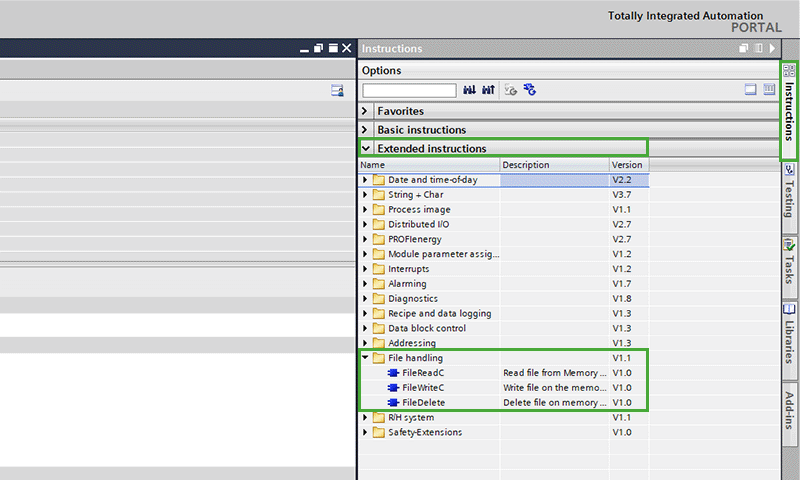
If you use our provided code, you do not need to add the FileReadC instruction manually. However, you can find it under Extended instructions in the File handling group in TIA Portal.
Minimum firmware version for CPU S7-1200
For S7-1200 CPUs, you can use the compact file instructions as follows:
- FileReadC, FileWriteC, and FileDelete are supported from firmware version V4.5 onward.
- You can load this firmware version on any S7-1200 hardware with firmware version V4.0 or higher.
- If the instructions appear greyed out and are unavailable in your project, your current firmware does not support them. In that case, upgrade the CPU firmware: Firmware download links for various S7-1200 CPU models. As noted, you can upgrade if your existing firmware is version V4.0 or higher.
FileReadC details
- You can read up to 16 MB (16,777,216 bytes) using FileReadC; the instruction reads the data segment by segment. Segment size depends on the device. For example, an S7-1500 CPU uses 32 KB (32,768 bytes) blocks. If you need to read more items than a single segment allows, call the instruction multiple times. Read all segments before accessing the data in your programme.
- Use the Offset and Length parameters to set the length of the data to read. When the read process completes, the resource is released.
- The FileReadC instruction runs asynchronously and processes across several calls. Begin processing with a rising edge at the REQ parameter.
- The Busy and Done parameters indicate the job status.
- If an error occurs, the Error and Status parameters signal this. For more information, see the Extended instructions S7-1200 and S7-1500 | FileReadC: Read file from memory card.