 Components to be set
REST API connection
To enable communication between a device and the Octalarm alarm dialler, you must configure an connection for each device. The REST API connection is monitored using periodic watchdog API requests. If a remote device using Octalarm Link fails to complete these watchdog API requests, the configured call list or service group will receive a watchdog system failure.
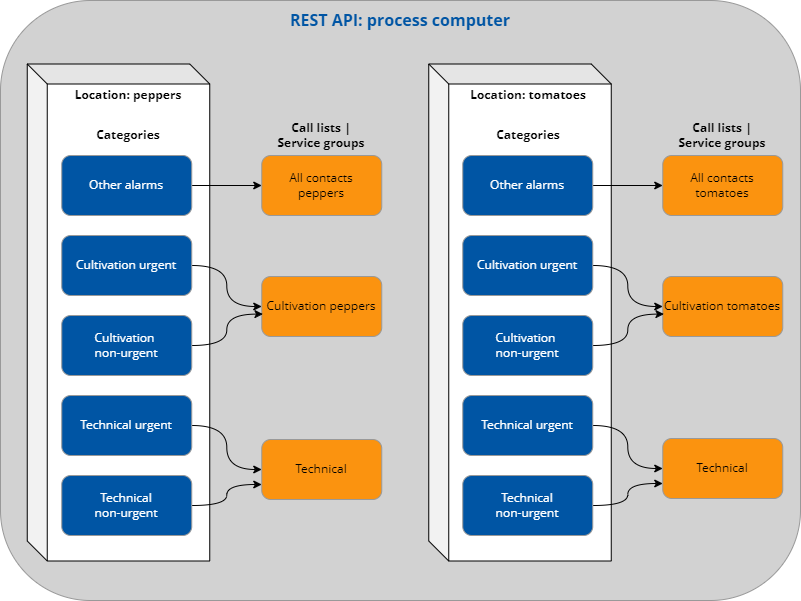
Location(s) and categories per location
Create one or more locations to handle alarms specifically for each location or group. Within these locations, you assign alarms to various categories.
You can manage locations and categories in two ways:
-
MinimalConfig: automatic management
Use a single API method to create, modify or delete locations and categories. This is especially useful for external devices such as PLCs, where manual configuration of several API calls is not possible.Good to know: You do not need to create locations and categories manually when using MinimalConfig. You can skip these steps.
-
CRUD: Create, Read, Update, and Delete manually
If your external device supports CRUD, use this method to communicate with the Touch Pro or ARA alarm dialler.Note: The CRUD method allows you to configure locations and categories yourself. You can find the required APIs under Locations and Categories.
Step-by-step commissioning
Tip: For optimal results, follow the steps in this section when commissioning the REST API. This process is illustrated with a practical example:
- Select the appropriate general methods and responses.
- Connect to the REST API and implement locations and categories via MinimalConfig or CRUD: Locations | Categories.
- Start alarm notifications via the REST API.
- Check the dialler settings.
Practical example scenario
In a greenhouse where growers cultivate tomatoes and peppers, a process computer controls climate, irrigation, and energy. This climate computer communicates with the Octalarm alarm dialler via REST API. By creating different locations, the grower can handle alarms per location in a targeted manner, categorising the alarms as cultivation alarms (urgent or non-urgent) or technical alarms (urgent or non-urgent).